> ## Documentation Index
> Fetch the complete documentation index at: https://modelcontextprotocol.io/llms.txt
> Use this file to discover all available pages before exploring further.
# MCP Inspector
> Interactive developer tooling for testing and debugging MCP servers, in the browser, on the command line, and in the terminal
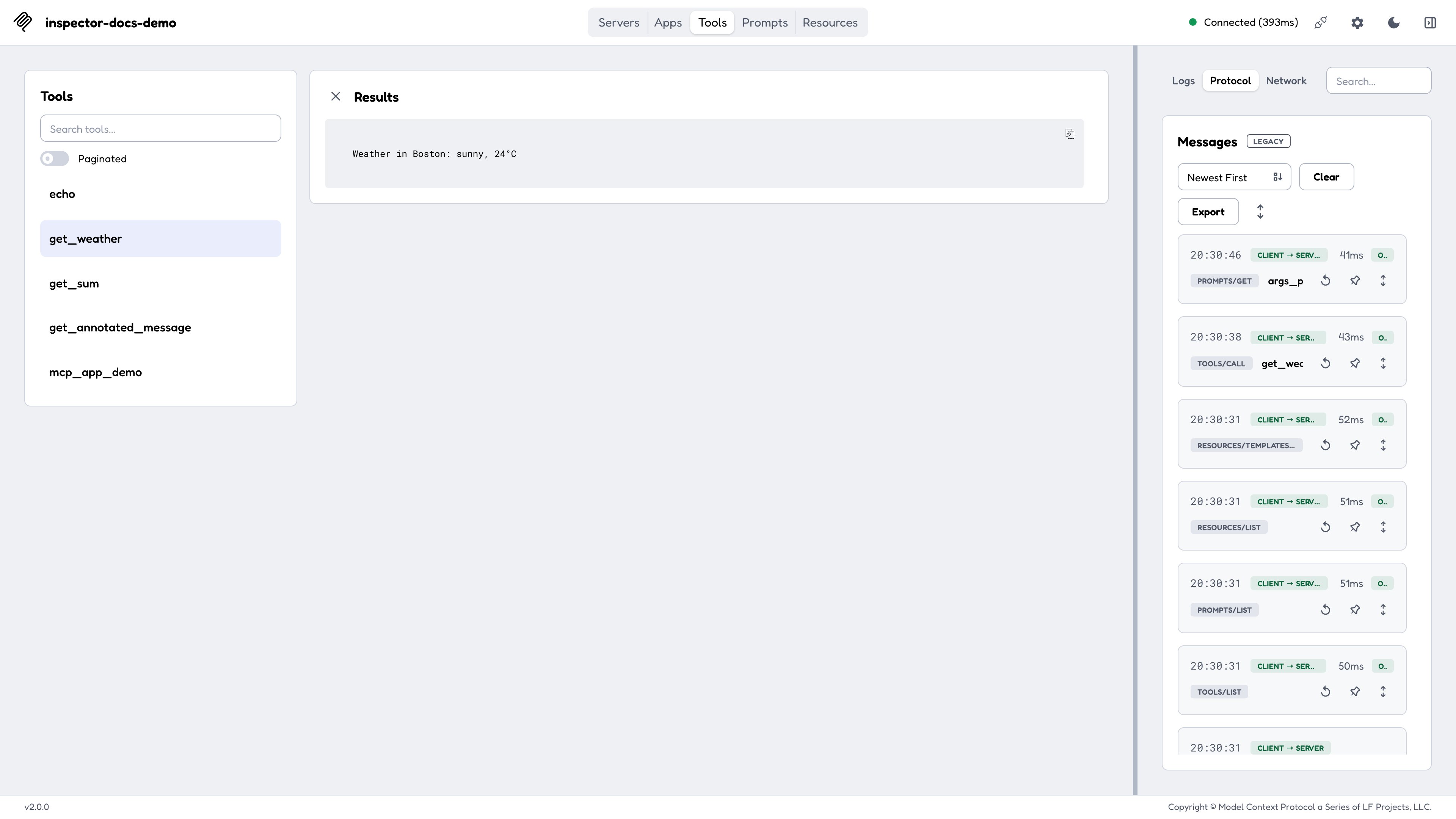
The [MCP Inspector](https://github.com/modelcontextprotocol/inspector) is the reference developer tool for testing and debugging [MCP servers](/docs/draft/learn/server-concepts). It ships as a single package, `@modelcontextprotocol/inspector`, providing **three clients behind one binary**:
| Client | Invocation | What it's for |
| ------- | ------------------------------------------- | --------------------------------------------------------------------------------- |
| **Web** | `npx @modelcontextprotocol/inspector` | A full graphical inspector in the browser. The default, and the richest surface. |
| **CLI** | `npx @modelcontextprotocol/inspector --cli` | A scriptable, machine-readable client for CI, shell pipelines, and coding agents. |
| **TUI** | `npx @modelcontextprotocol/inspector --tui` | An interactive terminal UI, for when a browser isn't available or wanted. |
All three are built on the same shared core, so a connection behaves identically across them: the same transports, the same configuration files, the same OAuth state on disk, and the same [protocol-era](/docs/draft/tools/inspector/protocol-eras) negotiation (legacy vs. modern 2026-07-28).
 ## Quickstart
The Inspector requires **Node 22.19.0 or newer** and runs directly through `npx`. No installation is required:
```bash theme={null}
# Launch the web UI and connect to a local stdio server
npx @modelcontextprotocol/inspector node path/to/server/index.js
# Or launch with no target and add servers from the UI
npx @modelcontextprotocol/inspector
```
The command prints a URL containing a one-time session token; open it in your browser. See [Web client](/docs/draft/tools/inspector/web).
```bash theme={null}
# List a server's tools and exit
npx @modelcontextprotocol/inspector --cli node path/to/server/index.js --method tools/list
# Call a tool and pipe the result into jq
npx @modelcontextprotocol/inspector --cli https://api.example.com/mcp --transport http \
--method tools/call --tool-name get_weather --tool-arg city=Boston --format json | jq .result
```
See [CLI client](/docs/draft/tools/inspector/cli).
```bash theme={null}
npx @modelcontextprotocol/inspector --tui node path/to/server/index.js
```
See [TUI client](/docs/draft/tools/inspector/tui).
### Inspecting published servers
Pass the command that launches the server as the Inspector's arguments, or point it at a remote server with `--server-url`:
```bash theme={null}
npx -y @modelcontextprotocol/inspector npx @modelcontextprotocol/server-filesystem ~/Desktop
```
```bash theme={null}
npx @modelcontextprotocol/inspector uvx mcp-server-git --repository ~/code/mcp/servers.git
```
```bash theme={null}
npx @modelcontextprotocol/inspector --server-url https://api.example.com/mcp --transport http
```
Always read a server's own README first, since every server requires different commands and arguments.
## Launcher flags vs. client flags
`mcp-inspector`, the binary that `npx @modelcontextprotocol/inspector` runs, is a thin launcher. It owns only two things:
1. **The mode flag:** `--web` (default), `--cli`, or `--tui`. At most one; passing two errors with `Specify at most one of --web, --cli, or --tui.`
2. **`-h` / `--help`.**
Everything else (`--catalog`, `--config`, `--server-url`, `--transport`, `--method`, the OAuth flags) is defined by the *client*, not the launcher, and the clients do not all define the same set. The [Configuration and flags](/docs/draft/tools/inspector/configuration) page is organized that way, by owner.
Mode flags are recognized only at the front of the command line: the first token that isn't `--web` / `--cli` / `--tui` ends launcher parsing, and everything after it is forwarded to the client unchanged. That's what lets a literal `--cli` appear later as one of your server's own arguments:
```bash theme={null}
mcp-inspector --cli node server.js --cli # mode is CLI; the trailing --cli goes to server.js
```
`--help` behaves differently with and without a mode flag. Bare `mcp-inspector --help` prints the launcher's help and exits. With a mode flag it is
forwarded, so `mcp-inspector --cli --help` prints the CLI's full flag
reference instead.
## Where to go next
A tab-by-tab walkthrough of the graphical inspector.
Method reference, output formats, exit codes, and CI recipes.
Terminal navigation and keyboard reference.
Catalog vs. config files, the full per-client flag reference, and
environment variables.
The OAuth flow end to end, mid-session re-authorization, and loopback
callbacks.
Legacy vs. modern (2026-07-28) operation, and how every tab changes between
protocol eras.
Importing client configs, reviewing MCP Apps, Docker, and network hosting.
Broader debugging strategies beyond the Inspector.
## Quickstart
The Inspector requires **Node 22.19.0 or newer** and runs directly through `npx`. No installation is required:
```bash theme={null}
# Launch the web UI and connect to a local stdio server
npx @modelcontextprotocol/inspector node path/to/server/index.js
# Or launch with no target and add servers from the UI
npx @modelcontextprotocol/inspector
```
The command prints a URL containing a one-time session token; open it in your browser. See [Web client](/docs/draft/tools/inspector/web).
```bash theme={null}
# List a server's tools and exit
npx @modelcontextprotocol/inspector --cli node path/to/server/index.js --method tools/list
# Call a tool and pipe the result into jq
npx @modelcontextprotocol/inspector --cli https://api.example.com/mcp --transport http \
--method tools/call --tool-name get_weather --tool-arg city=Boston --format json | jq .result
```
See [CLI client](/docs/draft/tools/inspector/cli).
```bash theme={null}
npx @modelcontextprotocol/inspector --tui node path/to/server/index.js
```
See [TUI client](/docs/draft/tools/inspector/tui).
### Inspecting published servers
Pass the command that launches the server as the Inspector's arguments, or point it at a remote server with `--server-url`:
```bash theme={null}
npx -y @modelcontextprotocol/inspector npx @modelcontextprotocol/server-filesystem ~/Desktop
```
```bash theme={null}
npx @modelcontextprotocol/inspector uvx mcp-server-git --repository ~/code/mcp/servers.git
```
```bash theme={null}
npx @modelcontextprotocol/inspector --server-url https://api.example.com/mcp --transport http
```
Always read a server's own README first, since every server requires different commands and arguments.
## Launcher flags vs. client flags
`mcp-inspector`, the binary that `npx @modelcontextprotocol/inspector` runs, is a thin launcher. It owns only two things:
1. **The mode flag:** `--web` (default), `--cli`, or `--tui`. At most one; passing two errors with `Specify at most one of --web, --cli, or --tui.`
2. **`-h` / `--help`.**
Everything else (`--catalog`, `--config`, `--server-url`, `--transport`, `--method`, the OAuth flags) is defined by the *client*, not the launcher, and the clients do not all define the same set. The [Configuration and flags](/docs/draft/tools/inspector/configuration) page is organized that way, by owner.
Mode flags are recognized only at the front of the command line: the first token that isn't `--web` / `--cli` / `--tui` ends launcher parsing, and everything after it is forwarded to the client unchanged. That's what lets a literal `--cli` appear later as one of your server's own arguments:
```bash theme={null}
mcp-inspector --cli node server.js --cli # mode is CLI; the trailing --cli goes to server.js
```
`--help` behaves differently with and without a mode flag. Bare `mcp-inspector --help` prints the launcher's help and exits. With a mode flag it is
forwarded, so `mcp-inspector --cli --help` prints the CLI's full flag
reference instead.
## Where to go next
A tab-by-tab walkthrough of the graphical inspector.
Method reference, output formats, exit codes, and CI recipes.
Terminal navigation and keyboard reference.
Catalog vs. config files, the full per-client flag reference, and
environment variables.
The OAuth flow end to end, mid-session re-authorization, and loopback
callbacks.
Legacy vs. modern (2026-07-28) operation, and how every tab changes between
protocol eras.
Importing client configs, reviewing MCP Apps, Docker, and network hosting.
Broader debugging strategies beyond the Inspector.